Moksh PDF Editor · AI Pack

AI that runs on your PC.
Pay once.

Background removal, passport photos, Magic Eraser, 4× upscaling and high-accuracy Indian-language OCR — with models that run on this computer, not in a cloud. Unlimited use: no credits, no per-image fees, no subscription.

All nine tools are in the app today: HD background removal (with batch mode), passport photo maker, Magic Eraser, 4× upscale, Hindi / English OCR, scan cleanup, scanned table to Excel, click-to-select and auto-redaction. New models arrive as app updates.

Launch price (regular ₹1,499) · incl. 18% GST · one-time per PC · Windows 10 / 11

Online payment opens soon — you can buy by email today. How to buy

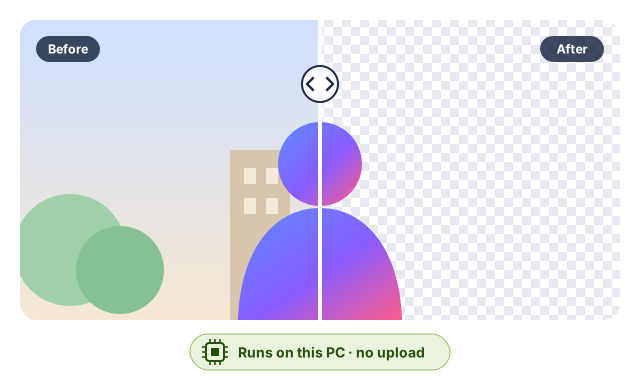
Illustration: the same portrait before and after AI background removal, the cut-out shown on a transparent checkerboard, labelled 'Runs on this PC, no upload'.

What each tool does

Every tool installs separately, so you download only what you use. Sizes are what the app downloads once; after that the tool works offline.

Available

HD background removal

Cuts out people, products and objects in one click. The HD model gives sharp edges and hair detail; small PCs use a light model automatically. Batch mode cuts out a whole folder of product photos in one go.

Download
4.4 MB (light model) · HD: 221 MB (200 MB on PCs with 6–8 GB RAM; 124 MB to run HD on the graphics card)
Models
BiRefNet_lite, U²-Net-p
Available

Passport photo maker

Finds the face, crops to the official size, puts it on a white or blue background and saves it at the exact size and KB a form asks for.

Download
25 MB (6.5 MB on PCs with less than 6 GB RAM)
Models
YuNet face detection, MODNet portrait matting
Available

Magic Eraser

Paint over an object, a stamp or a stain and it disappears, with the gap filled from its surroundings — offline on a normal 4–8 GB laptop.

Download
27 MB · optional 198 MB model for large areas
Models
MI-GAN, big-LaMa (optional)
Available

4× upscale

Enlarges small photos, logos and scans 2× or 4× without the usual blur.

Download
9.3 MB · optional 64 MB best-quality model (much slower without a graphics card)
Models
Real-ESRGAN general v3, RealESRGAN_x4plus (optional)
Available

High-accuracy Hindi / English OCR

A modern on-device OCR engine for Hindi, Marathi and other Devanagari text, and for English invoices and statements, with optional recognisers for Tamil, Telugu and Urdu. (Basic OCR in 14 languages is free without the AI Pack.)

Download
20 MB · optional Tamil, Telugu and Urdu recognisers, under 8 MB each
Models
PP-OCRv5 detection, Devanagari and English recognition; Tamil, Telugu and Arabic-script recognition (optional)
Available

Scan cleanup

Flattens a curled page photographed on a phone and turns every page the right way up.

Download
37 MB
Models
UVDoc dewarping, PP-LCNet page orientation
Available

Scanned table to Excel

Reads the rows, columns and cell text of a scanned statement or invoice into a spreadsheet.

Download
26 MB (about 12 MB of it shared with the OCR tool)
Models
SLANet_plus, PP-LCNet table classifier, PP-OCRv5
Available

Click-to-select

Click or drag on an object in a photo and it is selected — ready to cut out, recolour or remove.

Download
13 MB
Models
SlimSAM (a slim Segment Anything)
Available

Auto-redact scanned Aadhaar / PAN

Finds Aadhaar numbers (checksum-verified), PAN numbers and faces on scanned pages and marks them for true redaction.

Download
No extra model: uses the OCR and face-detection models
Models
PP-OCRv5, YuNet + MokshX rules

Downloaded once, then offline

After activation the app shows the size of each model before it downloads it. Install only the tools you want, and remove them any time to free space.

Download size per tool
ToolWith a graphics cardWithout
Background removal (light)4.4 MB4.4 MB
HD background removal221 MB (124 MB if you run HD on the card)221 MB (200 MB with 6–8 GB RAM)
Passport photo maker25 MB25 MB (6.5 MB under 6 GB RAM)
Magic Eraser27 MB27 MB
4× upscale9.3 MB9.3 MB
Hindi / English OCR20 MB20 MB
Scan cleanup37 MB37 MB
Scanned table to Excel26 MB26 MB
Click-to-select13 MB13 MB
All toolsabout 370 MB (about 275 MB if you run HD on the card)about 370 MB (about 350 MB with 6–8 GB RAM)

Optional extras — the best-quality models big-LaMa (198 MB) and RealESRGAN_x4plus (64 MB), and the Tamil, Telugu and Urdu recognisers for the high-accuracy OCR (under 8 MB each) — bring the total to about 655 MB at most.

How the download works

  • You buy the AI Pack and activate the key in the app (offline).
  • The app's AI models panel lists each tool with its size; you pick what to install.
  • Files come from MokshX's download server, dl.mokshx.net, and every file is checked against its SHA-256 fingerprint before it is used.
  • From then on the tools run with the internet off. Installed models never stop working, even if you never renew anything.
  • New and improved models are added to the pack for one year; after that, optional AI Updates cost ₹499/year.

Private by design

Cloud AI tools upload your photo or document to a server. The AI Pack does not.

Your images never leave the PC

Photos, scans and PDFs are processed in memory on your computer. No upload, no account and no telemetry — so ID cards, signatures and client documents stay where they are.

No meter running

There are no credits and no per-image fees. Remove the background from five photos or five thousand: the price is the same one-time ₹999 (launch price).

Which PCs it runs on

No special hardware needed — a graphics card just makes it faster.

Minimum

  • Windows 10 or 11, 64-bit, with 4 GB of RAM.
  • On PCs with less than 6 GB of RAM the app automatically picks the lighter models (for example the light background remover, MI-GAN for Magic Eraser and a compact portrait model).
  • Every tool also runs on the processor alone — it is slower, but it works. The exception is HD background removal, which needs 6 GB of RAM on the processor: below that the app uses the light background remover (or the graphics card, if you switch HD to it).

Faster with a graphics card

  • When Windows offers a usable graphics card (WebGPU), most AI tools run on it. HD background removal stays on the processor (about 10–30 seconds a photo) unless you switch it to the card in its dialog: then its model is 124 MB instead of 221 MB, but the first HD cutout after each start of the app takes a few minutes while the card prepares.
  • The big optional models (big-LaMa, RealESRGAN_x4plus) need about 6 GB of RAM or a graphics card.
  • Not sure? Use the free app first: it is the same program, and the AI models panel shows what your PC will download.

Price

One-time per PC, prices include 18% GST, and MokshX Private Limited issues a GST invoice.

Online payment opens soon — you can buy by email today. Email [email protected] with the plan you want and your request code (in the free app press Ctrl+K, run Activate licence… and press Copy). We reply with UPI / bank-transfer details and a GST invoice, then email your licence key after payment — usually within one working day.

AI Pack

₹999 one-time

Regular price ₹1,499Launch

  • All nine AI Pack tools on one PC, unlimited
  • New and improved models for one year
  • Then optional AI Updates ₹499/year
  • Installed models never stop working
Buy AI Pack — ₹999

Exam Pass

₹99 7 days

Pro + AI Pack · exam season (February to July)

  • For a week of form filling
  • Ends by itself, no auto-renewal
Buy Exam Pass — ₹99

Several PCs? Business packs of Pro + AI Pack: 3 PCs ₹4,999, 10 PCs ₹14,999 — see all plans. Terms · Refunds.

Licences of the AI models

Every model in the AI Pack is published by its authors under a permissive licence (Apache-2.0, MIT or BSD-3-Clause). MokshX re-hosts the files (a few converted to ONNX by MokshX from the official weights) and ships their licence notices in the app. What you pay for is the one-click install, the tuned tools around the models, and privacy — not exclusive model weights.

Models, licences and sources
ModelUsed forLicenceSource
Background removal — BiRefNet_lite (ONNX: fp32 1024 px and 768 px for the CPU, fp16 1024 px for the graphics card)Peng Zheng, Dehong Gao, Deng-Ping Fan, Li Liu, Jorma Laaksonen, Wanli Ouyang, Nicu Sebe (BiRefNet); ONNX exports by MokshX Pvt Ltd from the official MIT weights HD background removal MITNotice UpstreamCode
Background removal — U²-Net-p (u2netp, 4.4 MB)Xuebin Qin, Zichen Zhang, Chenyang Huang, Masood Dehghan, Osmar R. Zaiane, Martin Jagersand (U²-Net); ONNX conversion distributed by Daniel Gatis (rembg) Background removal (light model, low-RAM PCs) Apache-2.0Notice UpstreamCode
Inpainting — big-LaMa (ONNX fp32, 512×512)Roman Suvorov, Elizaveta Logacheva, Anton Mashikhin, Anastasia Remizova, Arsenii Ashukha, Aleksei Silvestrov, Naejin Kong, Harshith Goka, Kiwoong Park, Victor Lempitsky — Samsung AI Center (LaMa / big-lama); ONNX export by Carve (Carve-Photos/lama) Magic Eraser, large areas (optional) Apache-2.0Notice UpstreamCode
Inpainting / object removal — MI-GAN 512 Places2 pipeline (ONNX)Andranik Sargsyan, Shant Navasardyan, Xingqian Xu, Humphrey Shi — Picsart AI Research (ICCV 2023) Magic Eraser MITNotice UpstreamCode
OCR text detection — PP-OCRv5 mobile det (ONNX)PaddleOCR team, Baidu (PaddlePaddle) Hindi / English OCR, table to Excel (finding text) Apache-2.0Notice UpstreamCode
OCR text recognition — Devanagari (Hindi, Marathi, Nepali…) PP-OCRv5 mobile rec (ONNX)PaddleOCR team, Baidu (PaddlePaddle) Hindi / Marathi OCR (reading Devanagari) Apache-2.0Notice UpstreamCode
OCR text recognition — English/Latin PP-OCRv5 mobile rec (ONNX)PaddleOCR team, Baidu (PaddlePaddle) English OCR, table to Excel Apache-2.0Notice UpstreamCode
OCR text recognition — Tamil PP-OCRv5 mobile rec (ONNX)PaddleOCR team, Baidu (PaddlePaddle) Tamil OCR (optional) Apache-2.0Notice UpstreamCode
OCR text recognition — Telugu PP-OCRv5 mobile rec (ONNX)PaddleOCR team, Baidu (PaddlePaddle) Telugu OCR (optional) Apache-2.0Notice UpstreamCode
OCR text recognition — Arabic script (Urdu, Arabic, Persian…) PP-OCRv5 mobile rec (ONNX)PaddleOCR team, Baidu (PaddlePaddle) Urdu OCR (optional) Apache-2.0Notice UpstreamCode
Face detection — YuNet (2023mar, 227 KB)Shiqi Yu, Wei Wu, Hanyang Peng (YuNet / libfacedetection); packaged by OpenCV Zoo Passport photo maker, face redaction MITNotice UpstreamCode
Portrait matting — MODNet (ONNX fp32 + int8)Zhanghan Ke, Jiayu Sun, Kaican Li, Qiong Yan, Rynson W.H. Lau (MODNet, City University of Hong Kong / SenseTime); ONNX by Xenova (Hugging Face) Passport photo maker (portrait cut-out) Apache-2.0Notice UpstreamCode
Table structure recognition — SLANet_plus (ONNX)PaddleOCR team, Baidu (PaddlePaddle) Scanned table to Excel (table structure) Apache-2.0Notice UpstreamCode
Table classification (wired / wireless) — PP-LCNet x1.0 (ONNX)PaddleX / PaddleClas team, Baidu (PaddlePaddle) Scanned table to Excel (ruled / unruled tables) Apache-2.0Notice UpstreamCode
Document orientation (0/90/180/270) — PP-LCNet x1.0 (ONNX)PaddleX / PaddleClas team, Baidu (PaddlePaddle) Scan cleanup (page orientation) Apache-2.0Notice UpstreamCode
Document dewarping — UVDoc (ONNX, PaddleX export)Floor Verhoeven, Tanguy Magne, Olga Sorkine-Hornung — "UVDoc: Neural Grid-based Document Unwarping", SIGGRAPH Asia 2023; trained & exported by PaddlePaddle (PaddleX) Scan cleanup (flattening) Apache-2.0Notice UpstreamCode
Interactive segmentation — SlimSAM-77 uniform (ONNX, quantized)Zigeng Chen, Gongfan Fang, Xinyin Ma, Xinchao Wang (SlimSAM, NUS); Segment Anything by Meta AI; ONNX by Xenova (Hugging Face) Click-to-select Apache-2.0Notice UpstreamCode
Super-resolution ×4 — Real-ESRGAN general v3 (SRVGGNetCompact, ONNX fp32, 4.6 MB) + weak-denoise twinXintao Wang, Liangbin Xie, Chao Dong, Ying Shan (Real-ESRGAN, Tencent ARC Lab / SIAT CAS; "Real-ESRGAN: Training Real-World Blind Super-Resolution with Pure Synthetic Data", ICCVW 2021); PyTorch→ONNX export by MokshX Pvt Ltd from the official .pth checkpoints 4× upscale BSD-3-ClauseNotice UpstreamCode
Super-resolution ×4 — RealESRGAN_x4plus (RRDBNet 23 blocks, ONNX fp32, 64 MB)Xintao Wang, Liangbin Xie, Chao Dong, Ying Shan (Real-ESRGAN, Tencent ARC Lab / SIAT CAS; "Real-ESRGAN: Training Real-World Blind Super-Resolution with Pure Synthetic Data", ICCVW 2021); PyTorch→ONNX export by MokshX Pvt Ltd from the official .pth checkpoints 4× upscale, best quality (optional) BSD-3-ClauseNotice UpstreamCode

Listing a model here does not mean its authors endorse Moksh PDF Editor or MokshX. Model names are used only to identify the work they refer to. The full licence text and notice for each model are linked above and included in the app.

Questions

Is it really unlimited?

Yes. The models run on your PC, so there is nothing to meter: no credits, no per-image or per-page fees.

Do I need the internet?

Only to buy the key and to download each model once. After that every AI tool works offline.

Which tools can I use today?

All of them: HD background removal (with batch mode), passport photo maker, Magic Eraser, 4× upscale, high-accuracy Hindi/English OCR, scan cleanup, scanned table to Excel, click-to-select and auto-redaction are in the app today. New tools and model improvements arrive as app updates.

Does the AI Pack include Pro?

No — they are separate. Pro adds the office tools (bank statements to Tally, GST e-invoices, batch unlock and recipes, compare, mail merge, stamps). Buy Pro + AI Pack to get both with one key.

What happens after the first year?

Everything you installed keeps working for good. If you want the new and improved models that come after your first year, AI Updates cost ₹499/year — optional.

Will it run on my laptop?

If it runs Windows 10 or 11 (64-bit) with 4 GB of RAM or more, yes. Smaller PCs get lighter models automatically, and a graphics card makes everything faster. Try the free app first — it is the same program.