
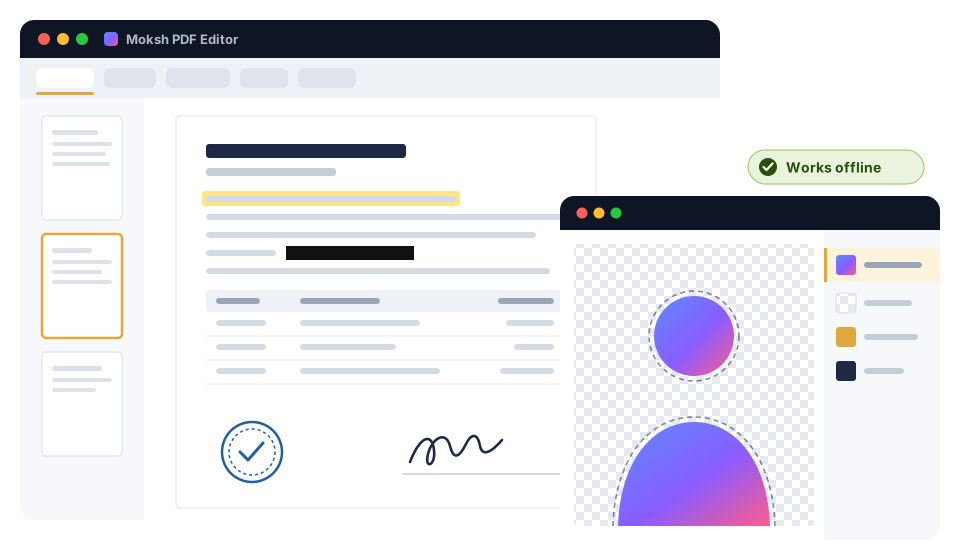
Everyday PDF work, done properly
The things you actually do with PDFs every week — free, offline and without uploading a single page to a website.
Edit text in place
FreeFix a typo, change a date or replace a word directly in the PDF, with find & replace. Move, replace and crop the images inside it too.
Annotate
FreeHighlight, notes, ink, shapes, text boxes and stamps. Comments stay editable when you reopen the file.
Fill & sign
FreeFill any form — even flat scans — reuse your name, address and PAN from an autofill profile, and sign with a drawn, typed or scanned signature, a .pfx file or a USB DSC token.
Merge, split, organize
FreeCombine files, split by pages or by file size, reorder, rotate, extract, insert and crop pages with drag-and-drop thumbnails.
Compress to an exact KB
FreeGovernment portal says "max 200 KB"? Type the limit — 100 KB, 200 KB, 1 MB or any size — and the app finds the best quality that fits under it, and tells you plainly if a file cannot get that small.
OCR in Indian languages
FreeTurn scans into searchable, copyable text. English and Hindi are built in; Marathi, Gujarati, Bengali, Tamil, Telugu, Kannada, Malayalam, Punjabi, Odia, Urdu, Sanskrit and Nepali are free one-time downloads.
Protect & unlock
FreeAdd an AES-256 password and permissions, or remove a password you know from a bank or CAMS statement so it opens without asking.
True redaction
FreeFind & redact PAN, Aadhaar, GSTIN, IFSC, bank account, card and mobile numbers. Aadhaar and GSTIN are checksum-verified, so random digits are not flagged — and redacted text is removed from the file, not just covered.
Watermark & page numbers
FreeText or image watermarks, headers and footers, page numbers and Bates numbering, on all pages or a range.
Compare two PDFs
ProSee exactly what changed between two versions of an agreement or a return — a text and a visual difference report.
For CAs and offices
The Indian paperwork that eats a CA firm's week — statements, invoices, passwords, signatures — handled in bulk, on your own PC.
Bank statement to Excel / Tally
ProMap the columns, check every running balance, and export to Excel, CSV or Tally XML with your ledger names.
GST e-invoice extraction
ProReads the signed e-invoice QR code first, then the printed GSTIN, HSN and tax fields, straight into Excel.
Batch unlock with PAN + DOB
ProRemove known passwords from a whole folder of statements at once, using PAN and date-of-birth password templates — for files you are entitled to open.
Batch recipes
ProRun unlock, compress-to-KB, watermark, page numbers, OCR or rename over a whole folder, and save the recipe for next month.
USB DSC token signing
FreeSign with Class 3 USB tokens — ePass2003, ProxKey, HyperPKI and others that appear in Windows — and verify signatures with one-click CCA India root trust.
Mail merge
ProFill one PDF form per row of a CSV or Excel sheet — 200 client letters or certificates in one go.
Stamp library
ProYour company seal, "Self-attested" or "Certified true copy" on every page or on selected pages, in one click.
A real photo editor, in the same app
Layers, masks and exact-size exports — including the photo and signature sizes that exam and job forms demand.
Layers & masks
FreeLayers, layer masks, adjustment layers and blend modes, with selections, retouching, Levels, Curves and filters.
Layer styles, groups, clipping
ProDrop shadow, stroke, glow and colour overlay, layer groups and clipping masks.
Free transform
FreeSkew, distort and perspective, plus Perspective Crop to straighten a photographed document or signboard.
Exam photo & signature presets
FreePick the form, get the exact pixel size and a file under the KB limit — with the size shown live before you save.
Passport photo print sheet
FreeLay out passport-size copies on 4×6 in, 5×7 in or A4 paper at true size, ready for the photo printer.
Open & save PSD
FreeOpen Photoshop files with their layers, keep working, and save back to PSD — or to PNG, JPG and WebP with live file size.
iPhone HEIC photos
FreeOpen HEIC/HEIF photos straight from a phone. If Windows lacks the codec, the app tells you which Microsoft Store extension to add.
AI Pack: AI that runs on your PC
One-time purchase, unlimited use, no credits and no uploads. The models are downloaded once after activation, then everything runs offline.
All nine tools below are in the app today. New tools and better models reach AI Pack owners as app updates.
HD background removal
Cuts out people and products, with hair-level edges where your PC can run the HD model. Batch mode does a whole folder of product photos in one go.
Passport photo maker
Finds the face, crops to the official size, white or blue background, exact size and KB.
Magic Eraser
Removes an object, a stamp or a stain and fills the gap — on a normal 4–8 GB laptop.
4× upscale
Enlarges small photos, logos and scans 2× or 4× without the blur.
High-accuracy Hindi / English OCR
A modern on-device OCR engine for Hindi, Marathi and English scans.
Scan cleanup
Straightens, flattens and fixes the rotation of documents photographed on a phone.
Scanned table to Excel
Reads the rows and columns of a scanned statement or invoice into a spreadsheet.
Click-to-select
Click an object in a photo and it is selected, ready to cut, recolour or remove.
Auto-redact scanned Aadhaar / PAN
Finds Aadhaar and PAN numbers and faces on scanned pages and marks them for redaction.
Your files never leave your PC
Salary slips, bank statements, Aadhaar copies, client returns — the documents you edit are exactly the ones that should not be uploaded to a website.
Processed on this PC
Every tool — including OCR and the AI Pack — works on your computer. Nothing is uploaded, and it keeps working with the internet off.
No account, no telemetry
There is nothing to sign up for, and the app sends no usage data. The editor window itself is blocked from the internet.
Internet only for downloads
It goes online to check for updates and the licence revocation list, to download the language packs and AI models you choose, and — only when you add a trusted timestamp or long-term validation to a digital signature, or press Check revocation online — to reach a public timestamp server and the certificate issuer's servers.
Offline activation
A paid licence is a key for one PC. You send a request code — a machine code, the Windows PC name and the app version, none of your files — and paste back the key.
Simple pricing. Pay once.
Use the free app for as long as you like. Buy Pro or the AI Pack only if you need them — one-time per PC, prices include 18% GST.
Online payment opens soon — you can buy by email today. Email [email protected] with the plan you want and your request code (in the free app press Ctrl+K, run Activate licence… and press Copy). We reply with UPI / bank-transfer details and a GST invoice, then email your licence key after payment — usually within one working day.
Free
Everyday PDF and photo work
₹0
No account, no watermark
- The whole PDF editor: edit, annotate, fill & sign, merge, compress to KB, OCR, protect, redact
- USB DSC token signing + CCA India trust
- The whole photo editor with exam & passport presets
- Offline, no daily limits
Pro
For CAs, offices and power users
₹999 one-time
Regular price ₹1,499Launch · or ₹599/year
- Bank statement to Excel / Tally
- GST e-invoice extraction
- Batch unlock (PAN + DOB) and batch recipes
- Compare PDFs, stamp library, mail merge
- Layer styles, groups, clipping masks
- Covers every 1.x and 2.x version
AI Pack
Offline AI tools
₹999 one-time
Regular price ₹1,499Launch
- All nine AI tools, unlimited: HD background removal with batch mode
- Passport photo maker, Magic Eraser, 4× upscale, Hindi / English OCR, scan cleanup, scanned table to Excel, click-to-select, auto-redaction
- New and improved models for one year
- Then optional AI Updates ₹499/year — installed models never stop working
Pro + AI Pack
Both, on one PC, with one key
₹1,799 one-time
Regular price ₹2,499Launch · ₹1,998 if bought separately
- Everything in Pro
- Everything in the AI Pack
- New AI models for one year
- GST invoice in your company's name
Business · 3 PCs
Pro + AI Pack on 3 PCs
₹4,999 one-time
₹1,666 per PC · one key per PC
- For a small office or CA firm
- One GST invoice for the pack
Business · 10 PCs
Pro + AI Pack on 10 PCs
₹14,999 one-time
₹1,500 per PC · one key per PC
- For larger teams
- More than 10 PCs? [email protected]
Exam Pass
Pro + AI Pack for 7 days
₹99 7 days
For exam season (February to July)
- For form-filling week: photos, signatures, PDFs
- Ends by itself — no auto-renewal
All prices in Indian rupees and include 18% GST. Licences are per PC and activate offline. MokshX Private Limited issues a GST invoice for every purchase. See Terms and Refunds.
What it costs, side by side
Adobe makes excellent, far larger products. If you mainly need the everyday tools on this page, here is how the prices compare.
| Product | Price | How you pay |
|---|---|---|
| Moksh PDF Editor — Free | ₹0 | Free |
| Moksh PDF Editor — Pro | ₹999 (launch) · ₹1,499 | One-time per PC, or ₹599/year |
| Moksh PDF Editor — AI Pack | ₹999 (launch) · ₹1,499 | One-time per PC |
| Adobe Acrobat Reader | ₹0 | Free |
| Adobe Acrobat Standard | ₹5,734.80 / year | Subscription (annual plan) |
| Adobe Acrobat Pro | ₹7,660.56 / year | Subscription (annual plan) |
| Adobe Photoshop | ₹6,899 / year | Subscription (annual plan) |
| Adobe Acrobat AI Assistant | ₹1,600.08 / year | Subscription add-on |
Adobe prices as listed for individuals on adobe.com/in on 12 October 2026, including GST. Prices and offers change — please check adobe.com/in for current prices. Each product includes features the other does not; compare the tools you actually need.
Adobe, Acrobat, Acrobat Reader and Photoshop are either registered trademarks or trademarks of Adobe in the United States and/or other countries. MokshX Private Limited is not affiliated with, or endorsed by, Adobe.
Questions
Does it really work offline?
Yes. Editing, OCR, signing, the photo editor and the AI Pack tools all run on your computer, and keep working with the internet switched off. Once the app and the OCR languages and AI models you want are installed, the only things that need the internet are optional: adding a trusted timestamp or long-term validation to a digital signature, and checking a certificate's revocation status online.
When does it use the internet?
Mainly to download things: the app itself, updates (it checks for them once a day and downloads one only when you click Download), extra OCR languages, and — once — the AI models you choose. It also fetches the licence revocation list. When you add a trusted timestamp or long-term validation to a digital signature, or press Check revocation online in the Signatures panel, it contacts a public timestamp server and the certificate issuer's certificate-status servers. Your documents and photos are never sent anywhere.
How does the licence work?
A paid licence is a key for one PC. In the app, press Ctrl+K and run Activate licence… (or open Settings → Licence → Activate…) and copy the request code.
Online payment opens soon. Until then, email the request code and the plan you want to [email protected]. We reply with UPI / bank-transfer details and a GST invoice, and email you the key after payment — usually within one working day. Paste the key into the same dialog. For a Business pack, send one request code per PC: you get one key per PC.
Paste the request code on the buy page. After payment you get the key on screen and by email; paste it into the same dialog. Business packs give one key per PC.
I'm moving to a new PC. What happens to my licence?
On the old PC, open Activate licence and press Deactivate. Then send a new request code from the new PC to [email protected] with your order ID or invoice number, and we reissue your key for the new computer. One move a year is free (see the Terms).
Can I get a refund?
The free version is your trial — please check that it works for your files and your PC before you buy. Within 7 days of payment you get a full refund if you have not activated the key, or if the app does not work on your PC and our support cannot fix it. An Exam Pass cannot be refunded once activated. Details are in our Refunds, Cancellation & Delivery policy.
Do I get a GST invoice?
Yes. Every price includes 18% GST and MokshX Private Limited issues a GST invoice for every purchase. Put your GSTIN and the name for the invoice in your email to get a B2B invoice for input tax credit.Enter your GSTIN at checkout to get a B2B invoice for input tax credit.
What are the system requirements?
Windows 10 or Windows 11, 64-bit, with at least 4 GB of RAM; the installer is 133 MB. The AI Pack runs on the same PCs: below 6 GB of RAM it automatically uses its smaller models, and a graphics card makes most AI tools faster. Installing every AI tool takes about 370 MB of disk space on a PC with 8 GB of RAM or more (about 350 MB with 6–8 GB); the optional extra models add up to about 285 MB more. The app shows each model's size before it downloads it.
Does it support Hindi and other Indian languages?
The app's menus are in English. Your documents can be in Indian languages: OCR in Hindi and English is built in, and Marathi, Gujarati, Bengali, Tamil, Telugu, Kannada, Malayalam, Punjabi, Odia, Urdu, Sanskrit and Nepali are free one-time downloads. The photo editor types Hindi and other Indian scripts with correct letter shaping.
Is my data private?
Your files stay on your PC — there is no account, no cloud processing and no telemetry, and the editor window itself is blocked from the internet. The app goes online only for the update check and the updates you choose to download, the licence revocation list, the language packs and AI models you ask for, and — only when you ask — signature timestamps and certificate checks (including Check revocation online). The request code you send us identifies the computer (by a machine code and its Windows PC name) and contains none of your files. See our Privacy Policy.
What happens when a yearly licence or the Exam Pass ends?
The Pro (and AI) tools lock again, and the free editor keeps working with all your files untouched. Nothing renews or charges you automatically.
Is the installer safe?
Every release is digitally signed by MokshX Private Limited, so Windows shows the verified publisher when you install it.
Windows says "Windows protected your PC". What should I do?
That is Microsoft Defender SmartScreen. It can show this warning for a new release, even a signed one, until enough people have installed it. Click More info, check that the publisher is MokshX Private Limited, then click Run anyway.
If the publisher is anything else, or "Unknown publisher", do not run the file: delete it and download the installer again from this page.
Start with the free editor
Install it, open your PDFs and photos, and upgrade only if you need Pro or the AI Pack.